Social listening tools tell you when someone posts about your brand. Google Alerts tells you when a page mentions you. Neither tells you what ChatGPT says when a buyer asks it to recommend a company in your category.
That conversation is private, and it happens many times a day. You can't see other people's chats, but you can do the next best thing: ask the same questions your buyers ask, consistently, and track the answers over time. This guide shows how.
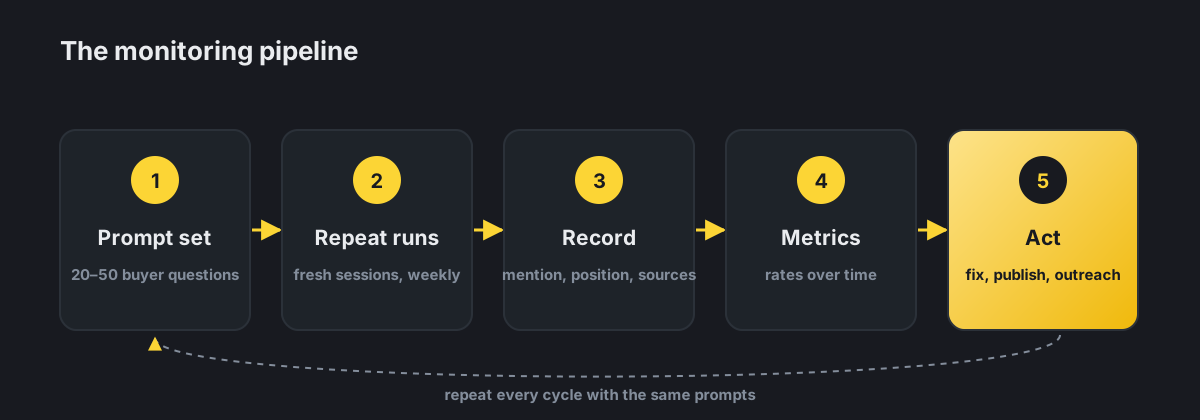
Step 1: Build a prompt set that mirrors real buyers
Your monitoring is only as good as your questions. Mix four types:
| Prompt type | Example | What it tells you |
|---|---|---|
| Category discovery | "What are the best accounting tools for freelancers?" | Whether you make the shortlist at all |
| Use-case / persona | "Which CRM is easiest for a three-person real estate team?" | Whether you're matched to your ideal customer |
| Comparison | "[Your brand] vs [Competitor]: which is better for small teams?" | How you're positioned head to head |
| Brand direct | "What is [your brand] and how much does it cost?" | Whether facts about you are accurate and current |
| Reputation | "Is [your brand] reliable? What do customers complain about?" | Sentiment and recurring objections |
Tips for a good set:
- Start with 20 to 50 prompts and keep them fixed, so results stay comparable week to week.
- Write them the way customers talk, not the way you'd write a keyword list.
- Include location or industry qualifiers if they matter to how you sell ("in Toronto", "for dental clinics").
- Add a few prompts where you currently don't appear. Those are your growth targets.
Step 2: Run each prompt more than once
AI answers vary. The same prompt can return a different list of brands a minute later. A single check is an anecdote; several checks give you a rate.
- Run each prompt several times per cycle (three is a sensible minimum) and record each result separately.
- Use fresh sessions with no memory or custom instructions, so your own history doesn't shape the answer.
- Note whether web search was used in the answer. Answers with live search behave differently from answers drawn only from training.
- Keep the same cadence: weekly suits most brands; daily makes sense only during launches or a reputation issue.
Step 3: Record the right fields
For every answer, capture the same fields. This turns chat transcripts into data you can analyse.
| Field | How to record it |
|---|---|
| Mentioned? | Yes / No |
| Position | Order in which your brand appears (1st, 2nd…) or "not listed" |
| Competitors named | Every other brand in the answer |
| Description accuracy | Correct / partly wrong / wrong, with a note of what's wrong |
| Sentiment | Positive / neutral / negative framing |
| Cited URLs | Every source link, and whether any are yours |
| Search used? | Whether the answer showed web sources |
| Date and model | So changes can be traced to model updates |
Step 4: Turn records into metrics
Once you have a few weeks of records, five numbers summarize your position:
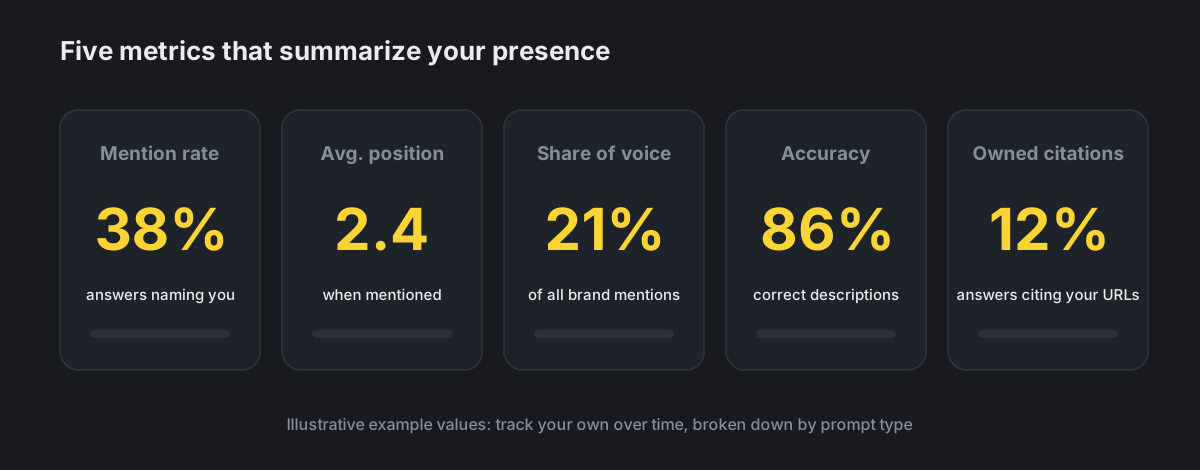
| Metric | Formula | Why it matters |
|---|---|---|
| Mention rate | Answers mentioning you ÷ total answers | Your overall presence |
| Average position | Mean position when mentioned | Being 1st vs 6th changes click-through and perception |
| Share of voice | Your mentions ÷ all brand mentions across the set | How you compare to the whole competitive field |
| Accuracy rate | Accurate descriptions ÷ answers describing you | Catches outdated prices, features or positioning |
| Owned citation rate | Answers citing your URLs ÷ answers with citations | Whether your pages are trusted as sources |
Break each metric down by prompt type. Many brands find they score well on "brand direct" prompts and poorly on "category discovery", which is the gap that actually costs them customers.
Step 5: Act on what you find
Monitoring only pays off when it changes what you do. Typical patterns and responses:
| What you see | Likely cause | What to do |
|---|---|---|
| Not mentioned in category questions | Weak off-site reputation in that category | Earn reviews, comparison-list inclusions and industry coverage |
| Mentioned, but described wrongly | Outdated pages or third-party listings | Update your pages and correct listings and old press |
| A competitor always listed first | Stronger presence in cited sources | Study the pages cited for them; fill the gaps on yours |
| Third-party pages cited, never yours | Your pages lack a direct, quotable answer, or are hard to crawl | Add clear answer sections; check crawler access and rendering |
| Negative sentiment | Recurring complaints in reviews or forums | Fix the underlying issue; respond publicly; ask happy customers for reviews |
| Sudden drop across many prompts | Model update or shift in which sources are retrieved | Check whether cited sources changed before changing your strategy |
Manual tracking vs a monitoring tool
You can start with a spreadsheet. It's a great way to learn your landscape. But it gets heavy quickly: 30 prompts × 3 runs × 4 engines is 360 answers a week to read and log.
| Manual (spreadsheet) | Monitoring tool | |
|---|---|---|
| Cost | Your time | Subscription |
| Scale | A few dozen prompts, one engine | Hundreds of prompts, several engines |
| Consistency | Varies with who's checking | Same method every run |
| History & trends | You build the charts | Built in |
| Alerts | None | Notifies you when something changes |
| Best for | Getting started, small budgets | Ongoing tracking, agencies, several brands |
Whichever route you choose, keep the method fixed. Changing prompts or cadence every month makes trends meaningless.
Common mistakes
- Checking once and panicking. One bad answer is noise. Look at rates over weeks.
- Only asking about yourself. "What is [brand]?" will nearly always mention you. Category questions are where visibility is won.
- Ignoring the sources. The cited URLs show you exactly which pages shape the answer.
- Testing while logged in with history. Personal memory and instructions skew results.
- Tracking ChatGPT alone. Buyers also use Gemini, Google AI Mode, Perplexity and Claude, and each draws on different sources.
Key takeaways
| Ask like a buyer | 20–50 fixed prompts across discovery, use-case, comparison, brand and reputation |
| Repeat runs | Answers vary, so measure rates, not single replies |
| Five metrics | Mention rate, position, share of voice, accuracy, owned citations |
| Read the sources | Cited URLs show which pages shape what ChatGPT says |
| Close the loop | Every finding should lead to a page update, a correction or an outreach task |
Further reading
- Where Does ChatGPT Get Its Answers? A Plain-English Guide for Businesses
- How to Optimize for AI Search: A Guide for You and Your AI Agent
- How to Rank on ChatGPT: What Actually Works (Based on Data)
- The ChatGPT Traffic Playbook: How to Track, Measure, and Grow
- AI Visibility Audit: How to Measure Your Brand's Presence in AI Search
Skip the spreadsheet. Echorank runs your buyer prompts on a schedule across ChatGPT and other AI engines, tracks mentions, competitors and cited sources, and alerts you when something changes. Start with a free AI visibility audit.
Sources
- OpenAI: Searching the web with ChatGPT
- Search Engine Journal: AI recognizes 96% of brands but mentions almost none (Victorious)
- Muck Rack: What is AI reading? (May 2026)
Editor: Frederic Desjardins - Echorank