People click links in ChatGPT answers every day. The trouble is that a lot of those visits don't look like ChatGPT visits in your analytics. Some show up correctly, some land in "Unassigned", and many disappear into "Direct".
This playbook covers the three stages in order: track the visits you can see, measure what they're worth (including the ones you can't see), and grow them on purpose.
How a ChatGPT visit reaches your site
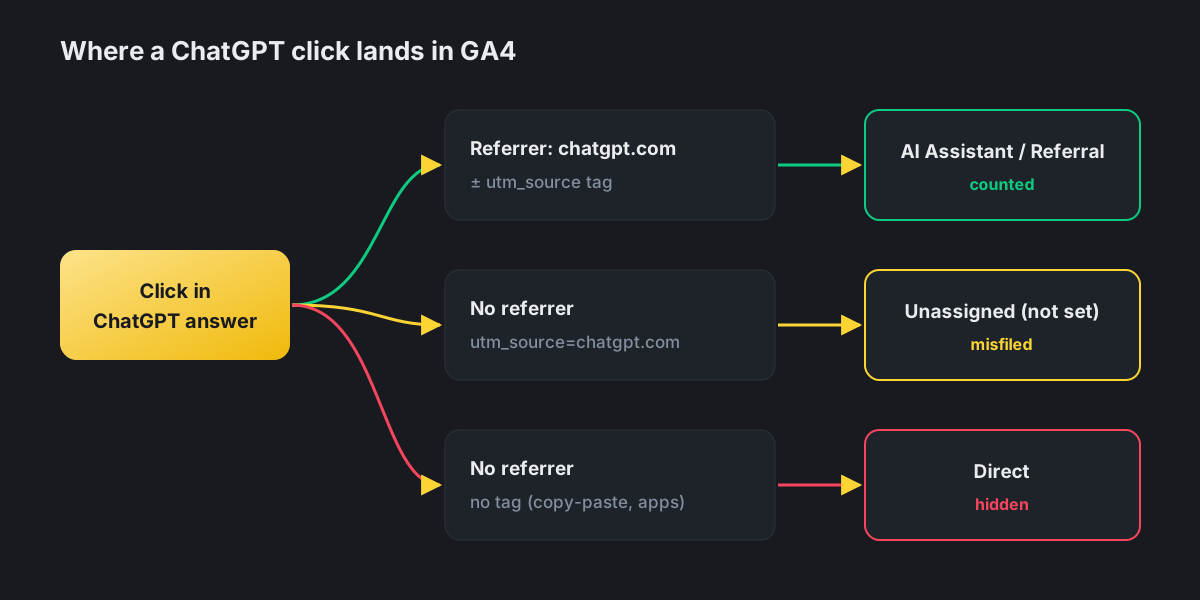
Whether analytics can identify a visit depends on two signals: the referrer the browser sends, and any UTM tag on the link.
| How the visit arrives | Referrer | UTM tag | Where it typically lands in GA4 |
|---|---|---|---|
| Click on a cited link in the web app | chatgpt.com | utm_source=chatgpt.com | AI Assistant (or Referral) |
| Click on an inline link | chatgpt.com | Often none | AI Assistant (or Referral) |
| Tagged link, referrer stripped (some apps, privacy settings) | None | utm_source=chatgpt.com | Unassigned, as chatgpt.com / (not set) |
| Link copied and pasted | None | Depends on what was copied | Direct, unless the tag survived |
| User reads the answer, later searches your brand on Google | n/a | n/a | Organic or Direct: AI influence is invisible |
Two details explain most of the confusion:
- ChatGPT adds a source tag but not a medium. OpenAI appends
utm_source=chatgpt.comto links in many answers. Without autm_medium, GA4's default rules can't place a referrer-less session in Referral, so it ends up as Unassigned. - Tagging isn't guaranteed. In October 2026, several analytics firms reported that for about a week ChatGPT links lost both the tag and the referrer, so clicks were logged as Direct until the issue was fixed. Check sudden drops against known glitches like this before concluding that interest fell.
Stage 1: Track
Use GA4's AI Assistant channel
On May 13, 2026, Google added an AI Assistant channel to GA4's Default Channel Group. When a session's referrer matches a recognized AI assistant, GA4 sets the medium to ai-assistant and groups it under AI Assistant automatically, with no setup needed. Google's announcement names ChatGPT, Gemini and Claude.
To check it: Reports → Acquisition → Traffic acquisition, dimension Session default channel group, and look for the AI Assistant row.
Keep a custom channel as a safety net
The native channel needs a readable referrer and works from a list of recognized assistants that Google hasn't fully published. Keep a custom channel group running beside it:
- Admin → Data display → Channel groups → Create new channel group.
- Add a channel named AI Referrals with the condition Session source matches regex:
chatgpt\.com|chat\.openai\.com|perplexity\.ai|claude\.ai|gemini\.google\.com|copilot\.microsoft\.com - Move it above Referral and Direct so it takes precedence.
- Because that condition matches on source, it also captures the
chatgpt.com / (not set)sessions that would otherwise sit in Unassigned.
Check landing pages with the query string
Build a landing page exploration using Landing page + query string and search for utm_source=chatgpt.com. This shows exactly which pages ChatGPT sends people to, even when channel attribution is messy.
Look at server logs too
Your web server or CDN logs record requests that never fire analytics, for example when visitors block scripts or decline consent. Searching logs for the chatgpt.com referrer or the utm_source=chatgpt.com tag gives you a second, independent count.
Stage 2: Measure
Treat GA4 as a floor, not a total
Every visit that loses both referrer and tag is counted as Direct, so reported ChatGPT traffic is a minimum. Use these signals to estimate the rest:
| Signal | What to look for |
|---|---|
| Direct traffic to deep pages | Rising "Direct" visits to blog posts or comparison pages that people rarely type by hand |
| Branded search growth | More searches for your brand name in Search Console as AI mentions grow |
| "How did you hear about us?" | Add "ChatGPT / AI assistant" as an option on signup and contact forms |
| Sales conversations | Ask new customers which tools they used to research |
Measure value, not just visits
AI-referred visitors often arrive further along in their research, because the assistant has already explained the options. Compare channels on what matters:
| Metric | Why compare it |
|---|---|
| Engagement rate and time on page | Shows whether AI visitors find what they expected |
| Conversion rate (signups, demos, purchases) | Tells you the channel's commercial value |
| Revenue or pipeline per session | Allows a fair comparison with paid and organic channels |
| Top landing pages | Reveals which pages AI answers trust and link to |
Connect traffic to visibility
Traffic is the outcome; visibility in answers is the cause. Track both side by side: mention and citation rates across a fixed set of buyer questions, next to the sessions and conversions they produce. If visibility rises and traffic doesn't, look at which pages are being cited and whether they give visitors a reason to click.
Stage 3: Grow
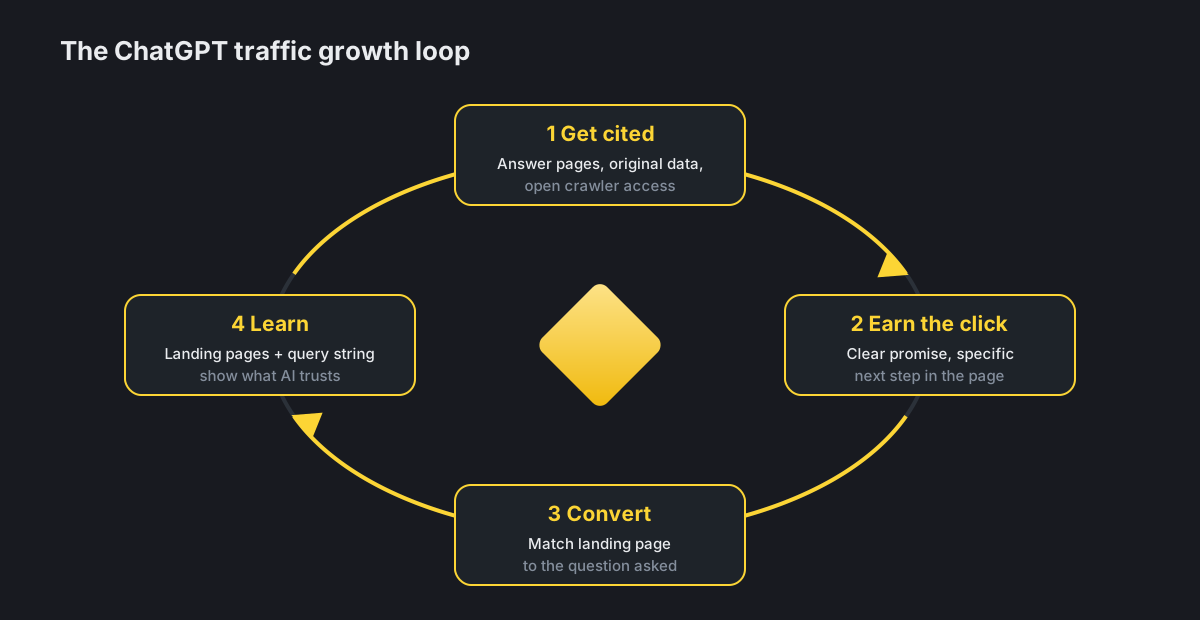
1. Double down on pages already cited
Your landing page report shows which URLs ChatGPT links to. Strengthen them: update the facts, add a clear answer near the top, and add an obvious next step (a calculator, a pricing table, a demo) so the visit turns into an action.
2. Build pages for the questions you want to win
Give each high-value question one strong page: a direct answer, specifics nobody else has, comparison tables and current numbers. Original data and tools are cited often because they give the assistant something it can't produce on its own.
3. Get into the sources that get cited
In many categories, the links ChatGPT shows are third-party pages: reviews, comparisons, industry articles. Being listed accurately on those pages can send you traffic indirectly through the cited page, as well as directly.
4. Keep the door open
Allow OpenAI's search crawler (OAI-SearchBot) in robots.txt and in any firewall or CDN bot settings, and make sure key content is in the server-rendered HTML. Pages the crawler can't read can't be cited.
5. Match the landing experience to the answer
Someone arriving from an AI answer expects the specific thing the answer promised. Take them straight to it: clear headings, a visible price or spec, and a call to action that matches the question they asked.
A monthly reporting template
| Section | What to include |
|---|---|
| Visibility | Mention rate, share of voice, owned citation rate across your prompt set |
| Traffic | AI Assistant + custom AI channel sessions, top landing pages, month-on-month change |
| Value | Conversions, conversion rate and revenue from AI-referred sessions |
| Hidden-traffic indicators | Direct visits to deep pages, branded search trend, survey answers |
| Actions taken | Pages updated, new pages, listings and coverage earned |
| Next month | Three priorities based on the gaps above |
Key takeaways
| Three landing spots | ChatGPT visits show up as AI Assistant/Referral, Unassigned or Direct |
| Use both channels | GA4's native AI Assistant channel, plus a custom regex channel as backup |
| GA4 is a floor | Estimate the hidden share with Direct, branded search and surveys |
| Value over volume | Compare conversions and revenue, not just sessions |
| Grow what's cited | Strengthen cited pages, build answer pages, earn third-party listings |
Further reading
- Where Does ChatGPT Get Its Answers? A Plain-English Guide for Businesses
- How to Optimize for AI Search: A Guide for You and Your AI Agent
- How to Rank on ChatGPT: What Actually Works (Based on Data)
- How to Monitor Brand Mentions in ChatGPT
- AI Visibility Audit: How to Measure Your Brand's Presence in AI Search
See the cause behind the clicks. Echorank tracks how AI engines mention and cite your brand, and its Bot Analytics shows which AI crawlers visit your site. Start with a free AI visibility audit.
Sources
- TechWyse: Google Analytics adds native AI Assistant channel to GA4's Default Channel Group
- Seer Interactive: Your AI traffic is hiding
- SearchPilot: AI traffic source reference (PDF)
- Relevant Audience: ChatGPT appears to drop UTM tags and referrer
- OpenAI: Overview of OpenAI crawlers
Editor: Frederic Desjardins - Echorank