/ GUIDE
Getting started with Echorank
This is the shortest path from an empty account to a dashboard that reflects your real reputation. Work through it in order — each step feeds the next, and the whole thing takes about fifteen minutes.
What you'll need
- A website you control
- Access to your Google Business Profile
- About 15 minutes
Interface labels change as the product ships. If a name here does not match what you see, check the current interface — the workflow is the same.
1Create your account
Sign up with your name, work email, business name and a password. New accounts start on a 7-day free trial. A payment card is required to start it and is charged when the trial ends unless you cancel first.
Use the email you actually read. Alerts, review notifications and the reports you set up later all land there by default, and changing it afterwards means re-checking every destination.
2Name your business correctly
The business name you enter becomes the tenant name — the label on reports, alert emails and anything you export or share with a client. Enter the name customers would recognise, matching how it appears on your Google listing.
Getting this right now saves rework later: the name shows up in places you will not think to check until someone else sees them.
3Connect your Google Business Profile
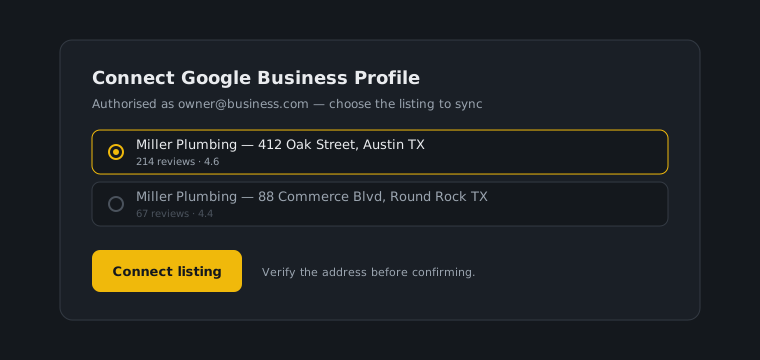
This is the step that turns an empty dashboard into a useful one. Connecting your Google Business Profile pulls in your existing reviews and keeps syncing as new ones arrive, so you stop finding out about a one-star two weeks late.
You will be asked to authorise access through Google and then pick a listing. If your account manages several locations, take the extra few seconds to confirm you are choosing the right one.
4Run the free audit and keep the result
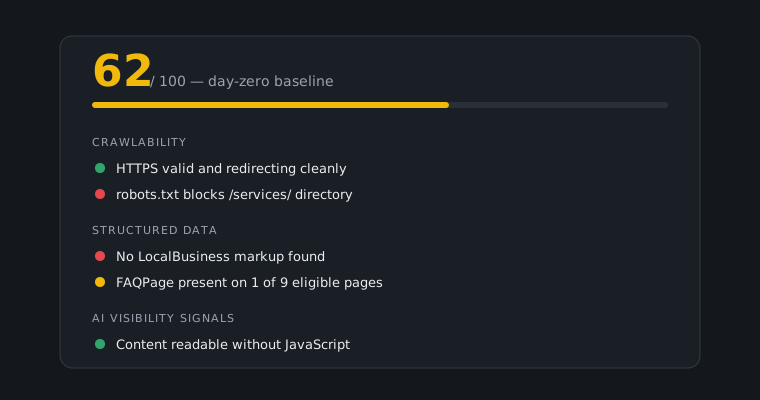
Run the audit and save the result. This is your day-zero benchmark, and it is worth more than it looks: in six weeks it is the only honest answer to the question of whether any of this worked.
The audit covers what crawlers and AI assistants can actually see on your site — technical basics, structured data, and the signals that decide whether an assistant can quote you at all. Read the itemised checks rather than just the score.
5Install the browser extension and import your history
Google and Facebook do not offer an export button for your reviews. The browser extension reads them off the page and sends them to your dashboard, which is how you get years of history in rather than starting from today.
Download and install it from the extension page, then use it on the review pages you want to bring in. Facebook and Trustpilot history come in the same way.
6Confirm the reviews arrived
Open Monitoring and check your reviews are there. Each one is scored for sentiment and risk automatically, so the list should look like your actual review history rather than an empty page.
If something is missing, it is almost always the import rather than the sync: re-run the extension on the page that is short, and check you were on the right listing when you did it.