/ GUIDE
Keyword research
Good keyword research starts with what customers already say, not with a tool. This guide goes from their language to a short, defensible list you can assign to pages and track — without burning your monthly search quota on curiosity.
What you'll need
- Your review history imported, or a folder of customer emails
- A paid plan for Keywords Explorer
- About 30 minutes
Interface labels change as the product ships. If a name here does not match what you see, check the current interface — the workflow is the same.
1Start from customer language
Before you open a keyword tool, read your own reviews and inquiry emails. Customers describe problems in words you would never invent at a desk — they ask for an emergency callout, not a 24-hour service provision.
Write down the recurring phrases. This list is worth more than any expansion tool's output, because it is evidence of demand rather than an estimate of it.
2Expand in Keywords Explorer
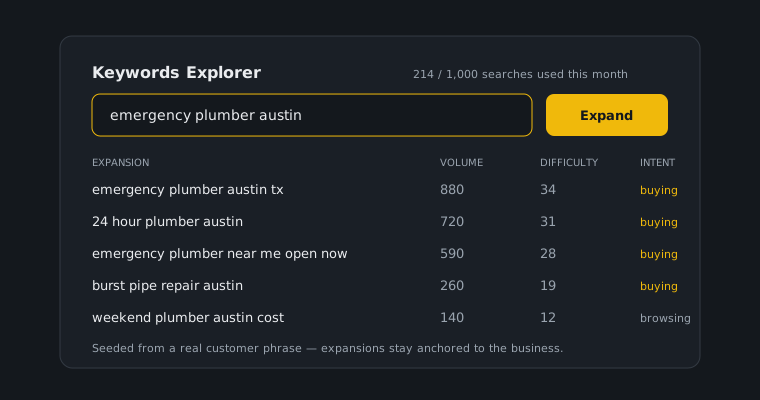
Take your best five or ten phrases into Keywords Explorer and expand from there. Working from real phrases keeps the expansion anchored to your actual business rather than to a category.
Searches count against your plan's monthly pool: 250 a month on Starter, 1,000 on Growth, and 5,000 on Agency. That is generous for deliberate research and easy to waste on idle typing, so batch your lookups.
3Filter by intent, not volume
The highest-volume term in your category is usually the least useful. Somebody typing a broad category name is browsing; somebody typing a service and a place is deciding.
Sort your expanded list into buying and browsing, and keep the buying half. A page ranking for a term with a tenth of the volume and ten times the intent is the better page.
A quick test: for each term, ask what the person typing it wants in the next hour. If the honest answer is "to read something", it belongs in a blog post, not on a service page. If the answer is "to hire someone", it belongs on the page that lets them.
4Assign one primary keyword per page
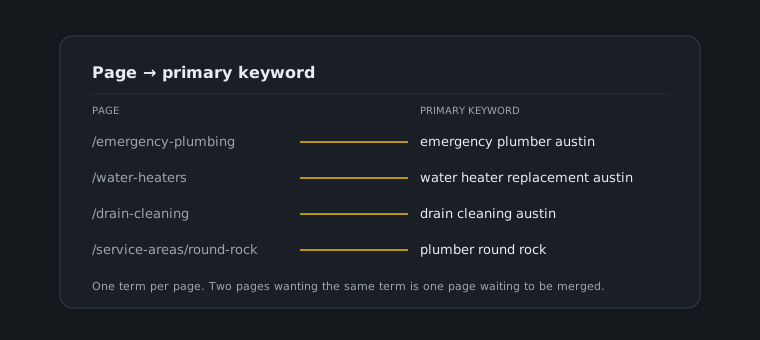
Each page gets one primary keyword. Two pages targeting the same term compete with each other, and the usual result is that neither ranks — you have split your own signals.
If two of your pages genuinely deserve the same term, that is a sign they should be one page.
5Add ten to twenty-five terms to Rank Tracker
Move the surviving list into Rank Tracker. Ten to twenty-five is the range that stays readable: enough to see patterns, few enough that you will actually look at it each month.
Keep the basket stable. Swapping terms in and out every few weeks destroys the trend line, which is the only part of rank tracking that tells you anything.