/ GUIDE
Track rankings
Rank tracking is only useful if you track the right terms and read them over the right timescale. This guide covers choosing a stable basket, connecting Search Console for real query data, and reporting monthly without over-reacting to noise.
What you'll need
- A keyword list you have already filtered
- Access to Google Search Console for your domain
- About 20 minutes to set up
Interface labels change as the product ships. If a name here does not match what you see, check the current interface — the workflow is the same.
1Pick a stable basket
Choose ten to twenty-five terms and commit to them. A useful basket has three parts: your brand name, your core services paired with the places you serve, and the pages that actually make money.
Resist adding every term you find interesting. A hundred tracked keywords is a list nobody reads, and the ones that matter get lost among the ones that do not.
2Add them to Rank Tracker
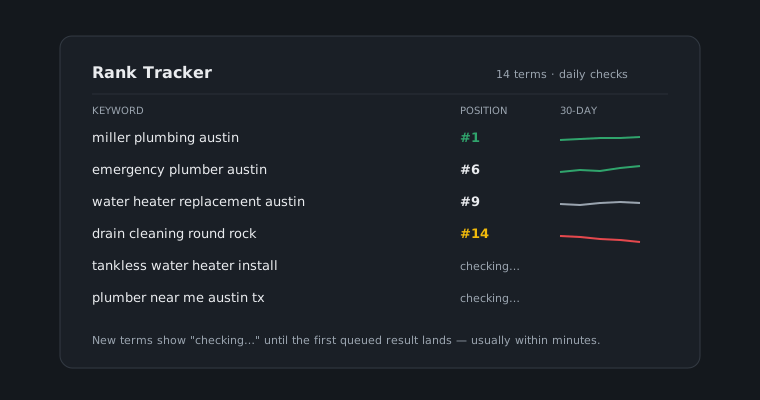
Add the basket to Rank Tracker. Checks are queued rather than instant — results usually land within minutes, and the terms are then re-checked on a schedule without you asking.
An empty result immediately after adding a term is normal. It means the check has not come back yet, not that you do not rank.
3Read trends, not days
Look at four weeks, not four days. Daily position numbers move for reasons that have nothing to do with you — personalisation, location, and ordinary result-page churn — and reacting to them means rewriting pages in response to noise.
The useful question is whether a term has drifted up or down over a month, and whether a change lines up with something you actually shipped.
4Connect Search Console
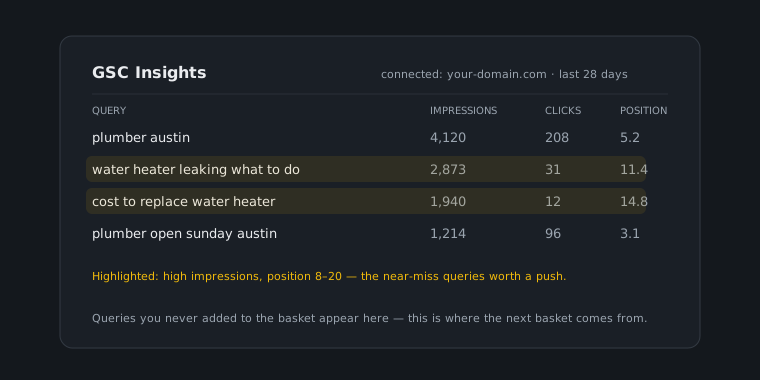
Rank Tracker tells you where you sit for terms you chose. Search Console tells you what people actually typed, how often you appeared, and how often anyone clicked — including queries you would never have thought to track.
Connect it and use GSC Insights. The two together answer different halves of the same question: your basket says whether you are winning the terms you targeted, Search Console says whether you targeted the right ones.
5Report monthly
Once a month, export the trend from the Reporting group and put it beside what you shipped. That comparison is the whole point of tracking: it converts a list of positions into a decision about what to do next.
Monthly is the right cadence for most businesses. Weekly reporting mostly documents noise, and quarterly is too slow to catch a problem while it is still cheap to fix.